RagmyAI ships with three AI models: Llama 4 Scout (the free default), GPT-4o mini, and Gemini 2.5 Flash (both available on Pro). They're all capable. They're not identical. Here's a plain-language guide to picking the right one for your task.
Llama 4 Scout — the default, and often the right choice
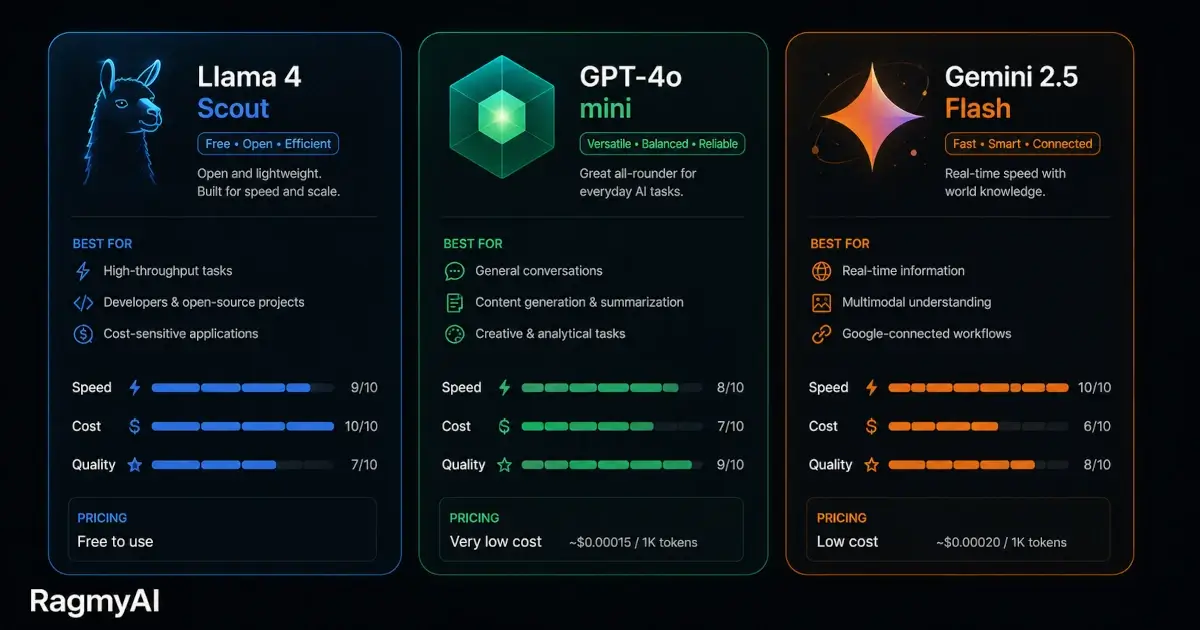
Llama 4 Scout is Meta's open-weight model. It's fast, it's free, and for RAG use cases — where the model is answering from your provided documents rather than drawing on general knowledge — it performs extremely well. The retrieval step does most of the heavy lifting; the model's job is to synthesise the retrieved passages into a readable answer, and Scout handles this reliably.
Best for: Document Q&A, training your chatbot, most everyday tasks. If you're using RagmyAI primarily to chat with your own documents, Scout is the right model. You don't need to upgrade.
Weaker at: Complex multi-step reasoning, creative writing with high stylistic expectations, tasks where depth of general knowledge matters more than grounding in your documents.
GPT-4o mini — the upgrade for general tasks
GPT-4o mini is OpenAI's efficient mid-tier model. It's significantly better than Scout at tasks that require general world knowledge, nuanced writing, and multi-step reasoning — but it's slower and costs a Pro subscription.
Best for: Writing assistance where style and nuance matter, tasks that mix your documents with general knowledge (e.g., "based on my product specs, write a comparison with competitor X"), code generation, or any conversation where you find Scout's answers too brief or shallow.
Weaker at: Speed on long documents. GPT-4o mini processes more carefully, which means it's slower on high-volume retrieval sessions. For pure Q&A throughput, Scout is faster.
Gemini 2.5 Flash — the one for long contexts and mixed media
Gemini 2.5 Flash is Google DeepMind's efficient model, notable for its very long context window and strong performance on tasks that mix text with structured data — tables, spreadsheets, dense reference material.
Best for: Documents that are heavy on tables, structured data, or numerical content. If you're training your AI on financial reports, research papers with data tables, or technical specifications with lots of figures, Gemini Flash tends to read these more accurately than the alternatives. Also good for very long Q&A sessions where maintaining coherence across many turns matters.
Weaker at: Creative writing. Gemini Flash produces precise, clear prose but tends toward the functional over the expressive.
A simple decision tree
- Chatting with your documents → Scout (free, fast, accurate for RAG)
- Writing assistance or general knowledge tasks → GPT-4o mini
- Documents with lots of tables or numerical data → Gemini 2.5 Flash
- Code generation → GPT-4o mini
- Long, multi-turn conversations → Gemini 2.5 Flash
- You want the fastest possible answers → Scout
You can switch mid-session
This is worth knowing: you can change models inside any conversation without losing context. If you start a session with Scout and realise you need GPT-4o mini for a specific follow-up, switch in the model picker and the conversation continues. The new model sees everything that's been said.
In practice, most users settle on one model per use case and rarely switch. But the option is there if a task changes complexity mid-conversation.